Categories
Category: Projects




Categories
Employee transport management system
Assignment given by techolution to be completed under 12 hrs
Solution explanation
Supervisor (track trips web design)

One of the problems that the supervisors were facing as mentioned in the given document is that they find it difficult to get a quick overview of which driver serves which route and whether if all the employees are actually being picked up as planned or not. Therefore I have come up with the above designs for the supervisor where they can not only get insight about which driver is serving which route but they will also be able to track whether employees are being picked up as planned through the “Pickup Status “ feature. Here the green tick will come once the person has provided his/her system generated otp details to the driver. As soon as the driver enters the otp into the mobile app it confirms the successful pickup of the employee to whom the otp was associated. Also the above dashboard holds information about the employees using employee id field and contains driver details through which it is easy to identify cab drivers and the employees using their services altogether .
Supervisor (cab management web design)

Also it is the work of the supervisors to add details about the new cab, manage the information about the cabs in service and details about the drivers associated with the service. Therefore considering all these points in mind I have come up with the above web design. Here If we look at the Action tab there two icons. The first icon is edit icon option through which we can easily update the existing details within the system. The second icon is the delete icon kept for deleting information about the cabs and drivers which are no longer in service.
Supervisor (Login web design)
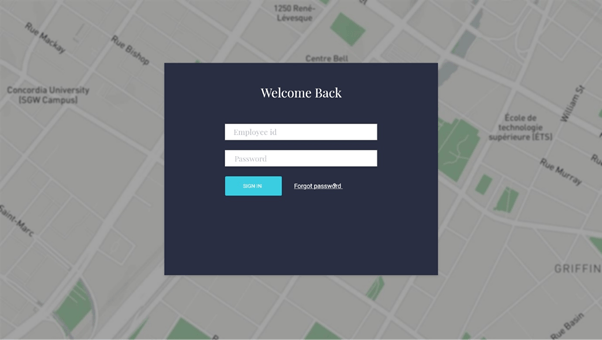
Here there is nothing to explain much but using the above screen the supervisors can successfully login to the system using their employee id and password in order to perform their tasks.
Cab drivers upcoming trips (mobile design)

Drivers after signing into the system will we directly be redirected to the above screen showing their upcoming trips. Also by clicking the history tab they can easily find the details of previously assigned trips.
Cab drivers (trip details extension)

In the previous screen only brief information about assigned trip is shown. Once the driver clicks the currently assigned trip he will be redirected to the above design wherein he will get the complete information about the number of pickups and from which location in a single trip. By clicking the “Let’s go” option the driver can easily start the trip and will be redirected to nearest first pickup location. Before going further from the first pick up point the driver has to enter the otp number which the employee holds for the successful pickup confirmation.
cab drivers route mapping and employees information

One of the problem that was discussed in the given document is difficulty in identifying the employee. The above design solves this problem as we can see the driver has easy access to employee id of the passenger, his phone number and also have the option of sending a text message to the employee in case he/she is not picking up the call. Also in the above design we can see the live map which is beneficial for the driver when he has been assigned a new route.
Cab driver (account details)

There is a menu icon on the top right corner of the mobile application if clicked will give the above mobile design and also the option of logout from the device. If we look below the profile image we can see number of trips completed by the driver.
Employee (cab scheduling)

Once the employee signs into the system he will see the above design. Here by providing the pickup, destination location details along with the date and time of the commute they can book the cabs according to their convenience.
Employee (weekly confirmation)
In the “Cab Scheduling” as soon as the employee clicks the confirm pickup he will be shown the below given popup asking them whether they want to keep this booking for the whole week or not. If clicked yes it will be booked for the whole week for working days and if the signs into the app again he will not be asked to fill or schedule the cab details for the week but will be directly redirected to upcoming trip mobile design.

Employee upcoming trips

The above design shows the upcoming trip which the candidate has scheduled and by clicking the history tab can see the details about the previous trips. Here we have provided the otp number on the top right corner for the user convenience.
Employee (How long, Cancellation, late logout option, colleagues information)

In the upcoming trips option the candidate can click the recent upcoming trip and will be redirected to the above mobile screen showing him information about the how far is the cab, colleague’s information etc. Here also we have provided the late logout option and if the candidate clicks that option his cab will be rescheduled accordingly therefore minimizing the delays. Also providing the information about the colleagues riding in the same cab makes it easy for the passenger to get details of the ride from fellow colleague incase driver may not be able to pick calls. Here we have also provided the option of cancel for cancelling the ride.
Employee (Cancellation popup)

If the candidate has decided to cancel his/her ride he will be asked for the reasons to do so and therefore he will see the above mobile screen.
Categories
Take Shift Android Application
INTRODUCTION
Our Motivation
For our day to day activities such as going out of the campus after our identification cards were being scanned, collecting couriers, making hostel complaints etc. we were in constant touch with the security guards and in some way we became the part of their daily life. We all shared a lot of things with each other like how life is going, whether they had lunch or not. Later on we came around a situation where a security guard was facing problem for getting a leave so that he could attend his family problems. He was in so much tension that we asked him the reason behind this and he said he was waiting for leave which he filed three days back and got no response from the security organization which outsource security guards to different organizations after doing a strict profiling. On asking why don’t you take help from other guards and in his response he said he don’t know who can takes his position before the sanctioning of leave as no information regarding the schedule of guards were made available to them.
In order to find the answers or if possible to build a solution which could help them we decided to take it as a research topic.
We choose IIITB as a field of study and conducted interviews of security guards of IIITB.For further procedure we followed Questionnaire and Observation.Conducted interview of both male and female security guards for holistic information regarding the their daily lives and problems.
Ux Process and methodology followed during this Project

User Research
Open ended interview questions were asked to the six participants with an average time of ten minutes after taking their consent. Participant’s inputs were recorded through video recordings and written notes.
Difficulties faced while conducting interviews
- Time factor: It was difficult to get time from guards as they were busy with their own activities.
- Guards were bit hesitant in giving the complete details in the first shot, fearing any kind of action from the management.
Methodology
The research methodology we have chosen is thematic analysis. Thematic analysis method is generally used for identifying and analyzing patterns within the data. The reason behind choosing the thematic analysis method is, we were looking in identifying patterned meaning across the dataset and to deduce the codes into different themes and analyzing the findings.We used the process of coding for developing themes from our data.Initially after the interviews were over, we started with the transcription. Once the transcription was over, we began deducting codes from the transcripts .The factors which were majorly working and not working for the system and conflicting views between the organization and security guards.
FINDINGS FROM INTERVIEW
- Difficult to maintain their work life balance.
- More Work & Less Salary (They works for 12 hours but salary is only 17,000).
- Sometimes on last day of the week they have to work for 24 hours due to shift change.
- Difficult to get leave, apply one week before to get leave.
Sample persona

This is Sujeet and he is a security guard at IIIT-B. He has been in IIIT –B campus for the past three years.His task is to take care of the work at the location which has been assigned to him and address the issues related to that location.He says the most of the times he has to work for 24 hours straight without any much benefit in the payscale.Also in case emergency situations related to the personal life he finds it difficult to get his leave sanctioned from the company.He has the knowledge to use smart phones, laptop and bar code scanner.
Sample Scenario
It was Monday morning; Sujeet got a call from his wife telling him about the illness of his mother. The family asked Sujeet to come home as soon as possible as his mother needs to be hospitalized.He is craving to go home but he has to wait for atleast three days in order to get his leave sanctioned from the company for which he is working.Therefore he started asking help from his fellow colleagues for which he has to call and visit them again and again.
Storyboard
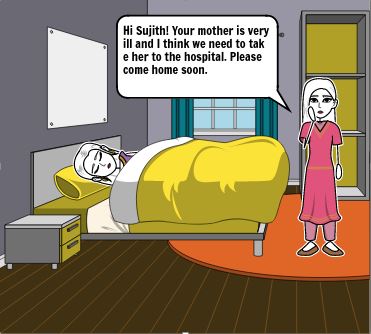
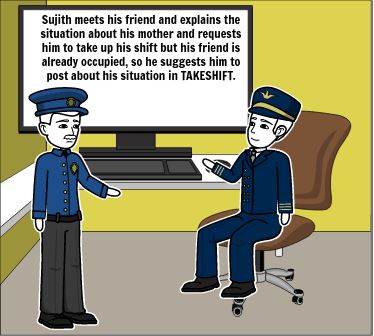
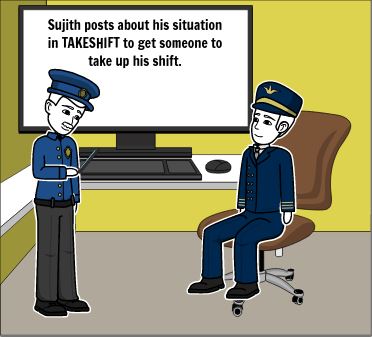
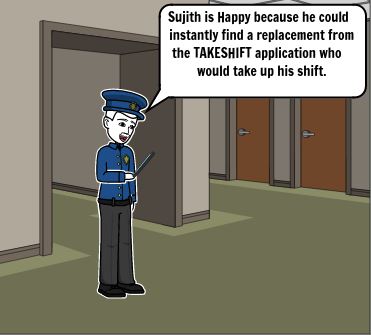
Before the starting developing our low and high fidelity prototypes we conducted a design workshop of one hour through which awareness was provided to the participant through scenarios and story-boards and later on their feedback was recorded for our initial low fidelity design. Here in order to make this post short we will be only talking about the final design of the prototype and the problems faced and the choices taken.
Prototype Designing
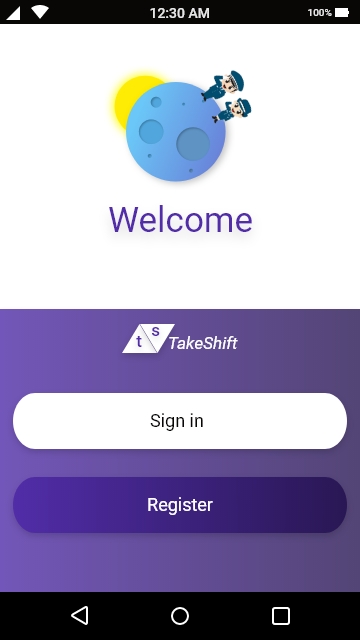
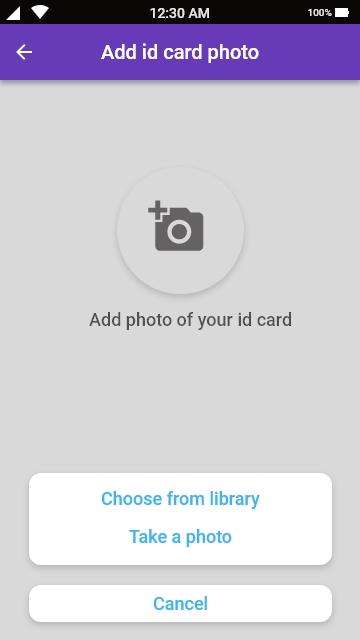
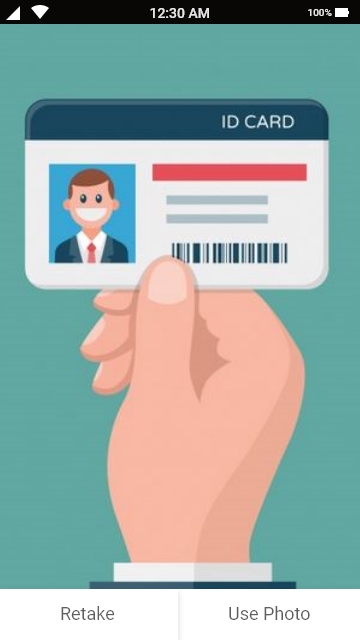
During the evaluation of our low fidelity wireframes one of the valuable response that we got from our participants was the problem with the registration process. One of the participant shared his concern about applications asking for too much details for registration without any prior notification which most of the time he finds cumbersome and is forced to exit the app. Based on his response we used minimalist design principle in order to make the registration process simple and easy. Before starting the registration process the participant will notified about the important documents i.e required for the registration process as shown below in the image agllary. We divided the whole registration process in two parts not asking for too much information at the same time. The first part includes the general information about the participant such as job id, Full name , Dob etc. along the uploading of the document that verifies this information. The next phase includes the filing up of the address details along with the uploading of the document that will be used to verify the details filled by the participant.
Images below represents the sequence of events during the Phase-I of the registration process.


Images below represents the sequence of events during the Phase-II of the registration process.


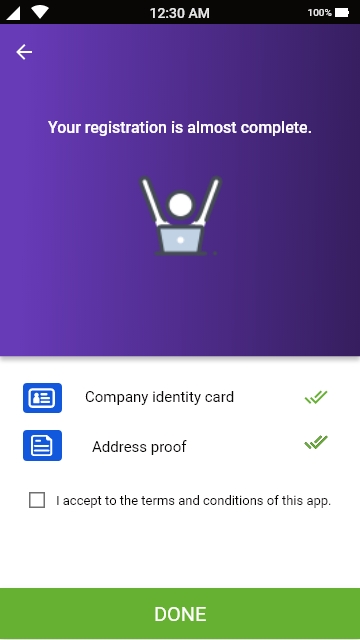
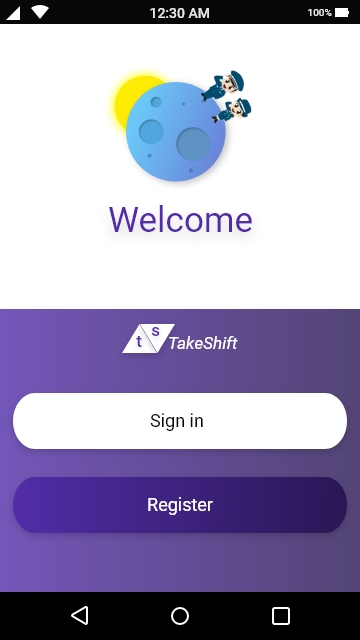
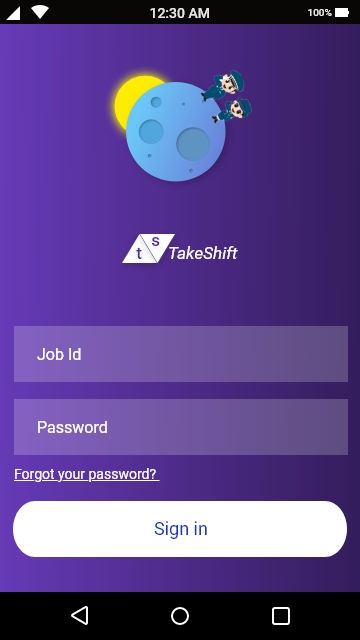
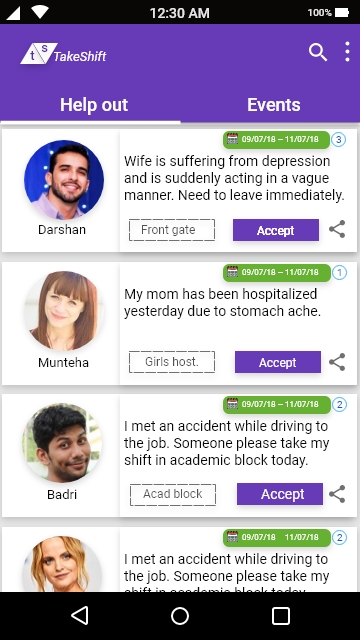
In phase-II of the registration process we have provided the option of skipping the step (providing the address details) just for the user convenience and they can provide these details later on.They will see an incomplete profile message when they click on their profiles.They will be able to post on this app and also will be able to accept the shifts and create event once they have provided all the details.But they can see the posts by the other persons.After the completion of the registration process the user will be required to login into the app using his job id and the password created. Once he has logged into the application he will see the below given screen where he can see the posts created by the other security guards who required help.
Search Icon
Users by using the search icon can easily find the specific posts and events that has been posted by an individual.This helps them to easily find that information which they are looking for.
Three dotted Icon
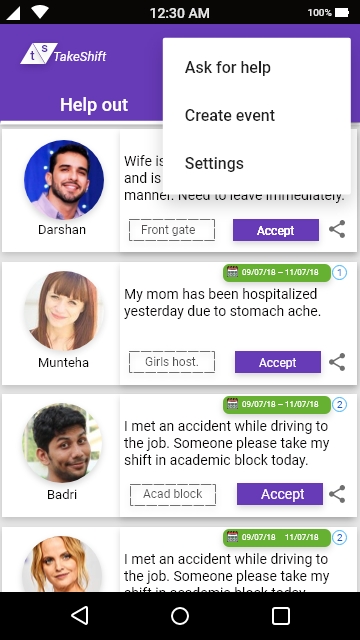
Idea behind creating this icon was to provide an easy navigation to the functionalities that this app provides to its user in the simplistic manner.When the user clicks this icon he will have three different options to select from “Ask for Help”, “Create Event”, “Settings”.
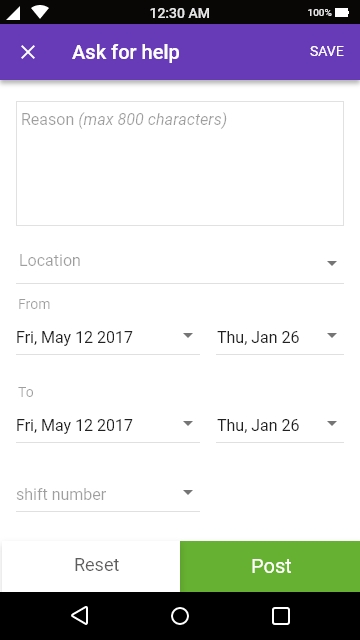
Ask for help
One of the important information that we obtained during our research work was that sometimes our users used social media platforms such as Whatsapp in order to ask for help during emergency situation.One of the major problem that they faced was providing all the details such as shift number, shift location, duration of shift etc in form of message which they find it very difficult to draft in the form of message. Therefore we decided to design the form and we have designed the form in such a way through which the users can easily draft the post in minimal amount of time not forgetting about the important details. The other problem which they faced was that most of the times their post on social media platforms gets lost because of lots of information coming at the same time due to which they have to repost the information again and again.This was one of the major reasons to come up with this application.
The biggest hurdle which we faced during the designing phase of the project was How to represent the information given by the user through ‘ask for help form’ in the form of post in minimal amount of space on the screen and at the same time providing all the details.Therefore we have come up with the below given design which includes all the information provided by the user efficiently in a limited screen space. The number enclosed in a circle represents the shift number which the seeker of the help is currently working on and wants someone else to take it in case of emergency.There are total of three shifts each of 8 hours within a single day taken by the different security guards for a single location. After every 8 hours the person taking care of the particular location changes.
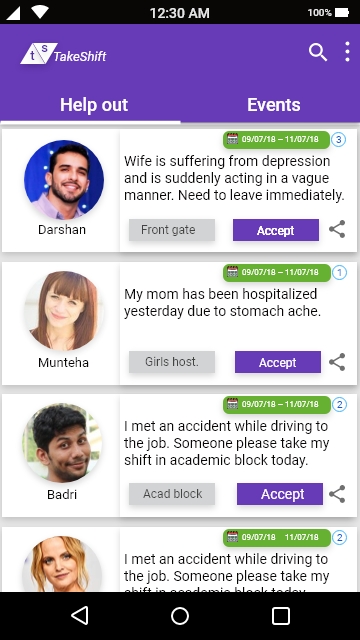
Purpose of the share icon
There can be a situation when a user who is looking at the post might not be able to help the user seeking help but he knows someone who can help therefore we have provided an easy option in this situation to share the post with their friends and colleagues through different channels which suits an individual.

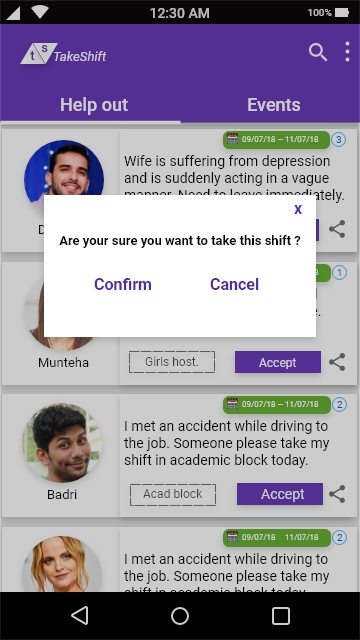
Accept Button
On clicking the accept button the user will see the notification popup screen asking him to confirm that he wants to accept the shift posted by the help seeker.After the user confirms that a text message will be sent to the registered number of the help seeker.In case the same number is linked with the whatsapp of the either parties text message will also be sent to the registered number.Also the post which the user has accepted will be pinned down to the “Your shifts art-board” along with the update button option through which the user can modify his choice based on his/her decision. As soon as the user modifies his choice the text and whatsapp message again will be sent to the help seeker.

Create Event
In order to aware the security guards in relation to happenings around the campus and upcoming events we have provided an additional functionality. Also by providing the information of the upcoming events this app helps them realize their workload in upcoming days and if required they can plan their pending (family issues, bills etc) work accordingly.


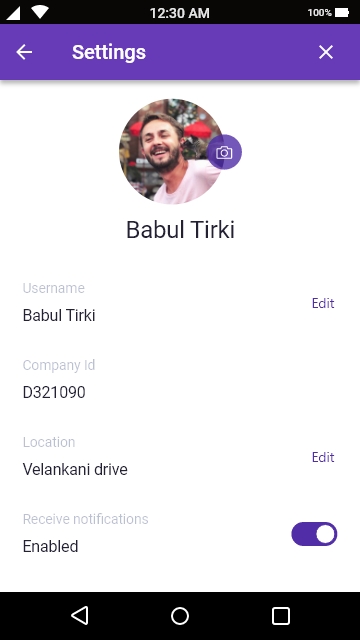
Settings
By clicking on this Icon the user of the application can make changes to his/her profile such as uploading profile photo , changing phone number. He/she cannot make changes to his/her job id as it uniquely identifies them. We have also provided the toggle button option asking the user whether they to be notified about new posts by the other users. If turned on the user will be notified via sms and also by whatsapp if his number is active on whatsapp. The idea behind using sms is to provide information to user irrespective of their access to internet and also this is the reason for making the phone number as a mandatory field during the registration process.
Testing and Evaluation
We used usability testing and think-aloud method in order to test our prototypes regularly and incorporated the results obtained in our prototypes.
Conclusion
While a fully developed product could further inform the benefits of this application and how it can best support security guards , the findings emerging from this study confirm that when made available, a strong majority of participants with improved version of this platform will use this system as a tool to ask help from their fellow colleagues whenever they are in need and ask someone to take their shifts.
Future work
TakeShift application till now has been designed considering only the needs and requirements of the security guards at IIIT-b campus and in our prototype during the registration process we considered only one company and asked the job id for that company which employs our users on contract basis. We can generalize this concept by adding drop down column of different organizations providing security services and also location wise filtering followed by asking the job id of that company.Our help out section and events section will only show the information about the organization which has been selected by our users through filtering during the registration process.
Problem
WhatsApp, owned by Facebook, is one of the most popular instant messaging apps globally, with over a billion people using it each month. It is widely used across Asia, Africa, Latin America, and Europe. But increasingly, WhatsApp has also been documented as a leading factor in propagation of fake news, responsible for lynchings, political propaganda, and sectarian clashes. At the same time, because it is an end-to-end encrypted platform, WhatsApp cannot access or see the content being shared by its users and so there is a general view that there is very little it can do (Gupta and Taneja, 2018).
Challenge
Here the challenge is to build the fake news detection system without violating any of the WhatsApp policies (end to end encryption and privacy policies).
“Forwarded” message option a failed attempt
“Forwarded” message option a failed attempt WhatsApp has been adding some minor tweaks to its products to check the spread of fake news. In a beta release in 2017, WhatsApp began mentioning to users that a particular message has been forwarded multiple times. More recently, WhatsApp began labeling forwarded messages as “forwarded,” so that a recipient can recognize that the sender isn’t the original author of the message. In both cases, WhatsApp is likely cross-checking metadata to identify forwarded messages, for reasons expanded on below. Additionally, WhatsApp has limited its forwarding option to allow forwarding to only five chats at a time, and the company has removed the “quick forward” button next to media messages. However, none of these minor tweaks are enough in themselves. Since “forwards” constitute a significant proportion of messages that a WhatsApp user receives, simply adding information about whether a message is forwarded or not isn’t enough to differentiate fake news from genuine news for a receiver. While adding “friction” to the process of forwarding is good, a fake news message can still continue to travel on the network unchecked forever (Gupta and Taneja, 2018).
In summary, none of the measures taken by WhatsApp would eliminate the “fake” pieces of content from its network. Therefore, we propose one such approach here, which includes content moderation. Our premise is that a piece of misinformation that has gone viral merits removal after due fact checking rather than trying to slow down the forwarding capability of all media blindly on the platform.
Some important points to consider for our solution
First in an affidavit filed by the WhatsApp company in September 2016 the Delhi High Court the company suggests
“To improve performance and deliver media messages more efficiently, such as when many people are sharing a popular photo or video, WhatsApp may retain that content on its servers for a longer period of time.”
This means WhatsApp does retain popular files on its servers in order to deliver faster file transfers, resulting in better user experience and also save internet bandwidth of users (Gupta and Taneja, 2018).
Second, WhatsApp’s encryption security paper states that WhatsApp uniquely identifies each attachment with a cryptographic hash (a cryptographic text that is unique for each file) and whenever a downloaded attachment is being “forwarded,” WhatsApp checks if a file with the same cryptographic hash already exists on its server. In case the answer is yes, WhatsApp does not upload the file from the user’s phone to the server, and instead sends a copy of the file stored on its server directly to the final recipient. This implementation, while improving the user experience by improving the speed of the file transfer and saving Internet bandwidth of the end-user, also demonstrates that WhatsApp can point to specific files residing on its servers despite the end-to-end encryption. Hence, it has the capability to track a specific piece of content on its platform even if it does not know what is the actual content inside that message due to end-to-end encryption (Gupta and Taneja, 2018).
Third, WhatsApp’s own privacy policy suggests that it can read the metadata:
“WhatsApp may retain date and time stamp information associated with successfully delivered messages and the mobile phone numbers involved in the messages, as well as any other information which WhatsApp is legally compelled to collect.”
Lastly, WhatsApp changed its terms of service in August 2016 to say that it would be sharing phone number and metadata attributes such as last seen with Facebook.
“In 2014, it (Facebook) bought WhatsApp, which would theoretically give it direct insight into who messages who. Facebook says it doesn’t currently use information from WhatsApp for People You May Know, though a close read of its privacy policy shows that it’s given itself the right to do so.”
It means even if the WhatsApp cannot read the contents of the message but still it can access the cryptographic hash of a message, the time it was sent and other details. Therefore WhatsApp has the ability to trace the journey of the message.
Proposed Solution
Server side
According to WhatsApp’s encryption security paper , WhatsApp uniquely identifies each attachment with a cryptographic hash and whenever a downloaded attachment is being “forwarded,” WhatsApp checks if a file with the same cryptographic hash already exists on its server.We call this cryptographic hash a blueprint which uniquely identifies each message or file on its server. This means that although WhatsApp can’t read the message but it can trace the life span of the message. Utilizing this feature we can implement a three different types of flag (fake, non-fake, don’t know) on server side to count the user response. If the user has marked the particular message as fake, based on the blueprint that identifies a message or file its fake flag counter will be incremented by 1 and if the user updates his/her response and changes it to non-fake then fake flag counter will be decremented by one and non-fake flag counter will be incremented by1. Similar rules can be applied to the non-fake and don’t know flag counter.

User Side
User identifies a particular piece of information as fake and mark it fake by selecting the message through long tap and clicking on the fake news icon. This action by the user will also increment the fake flag counter by 1 on the server side.
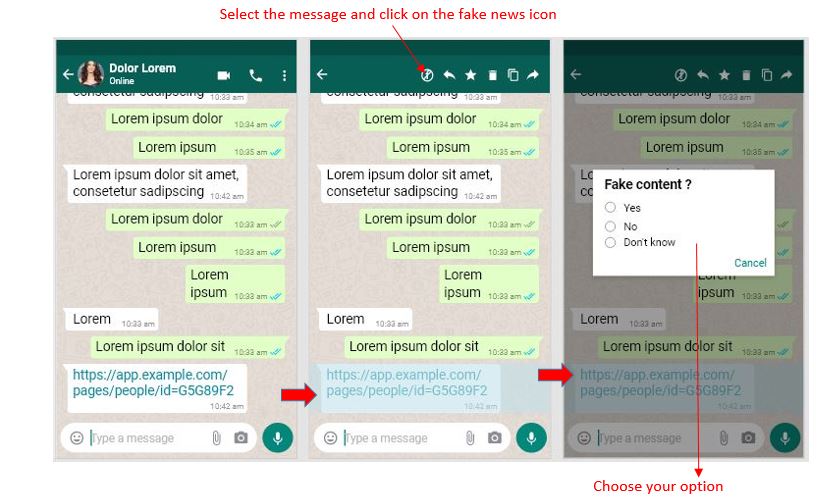
Why Popup model with three different responses?
Let’s consider a situation where instead of the popup model the user directly marks the piece of information as fake. The easiest way to do this to select the message and click on the fake information icon and no popup is shown to him. The system will directly color code his response to red in just two steps. Now the problem is what if the user by mistake marked the information as fake and want to change his response. One possible solution is to provide three different icons for three different responses but that will take a lot of top navigation space and the other option is to provide the drop down menu. Drop down menu will not be the good choice in this scenario for good user experience because of the way the application is designed. We can also see on the whatsapp application when the user selects the message, the top navigation does not contain the three dot icon. One possible reason why whatsapp has done this is that the drop down menu of the three dot icon does not contain any option that relates to the action that can be applied on the message and all the actions associated with message have been provided to the user through icons on the top navigation. Here we are adding one more action to the top navigation in order to collect the user response regarding a certain piece of information and therefore we preferred the popup model in comparison to the drop down menu.
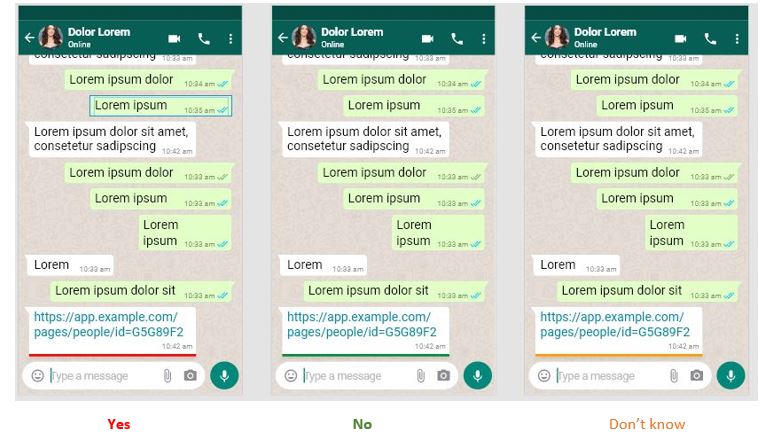
Based on the user’s choice (yes, no, don’t know) three possible outputs are there differentiating in colors
Color choice
Three different colors has been chosen based on whether the user’s input is “yes”, “no” or “don’t know” which will immediately be reflected below the users selected message. Also this will help the user to immediately identify his previous response based on the color marking without any hassle and in case if he/she feels like the previous response was not good or wrong (validation) they can easily correct their mistake by updating their responses.
Red color: It is an emotionally intense color and is associated with fire and blood. It is widely used to indicate danger and brings text and images to foreground. Due to this reason we have color coded the fake response from the user as red.
Green color: It is the color of nature and is used to indicate safety as opposed to red. Therefore we have green color coded the non-fake user response.
Orange color: Orange is the color of fall and harvest. It represents encouragement and stimulation. Therefore we have used this color if the user marks any information as don’t know. We want to encourage him to try to validate the information.
Updating response
Let us consider a situation where a user has marked a message fake by mistake and he now wants correct his/her mistake. He can update his response by following these steps.
- Selecting the message again.
- Click on the fake news icon.
- Select the correct input.
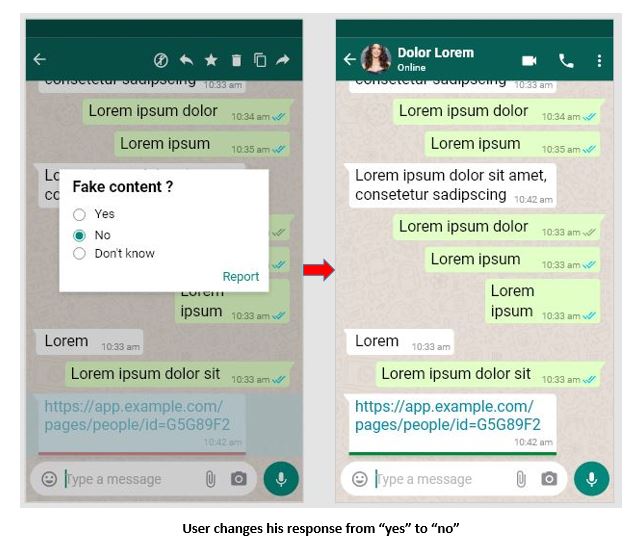
When the user changes his response from “yes” to “no” the fake flag counter will decrement by 1 and the non-fake flag counter will be incremented by 1 with no change in the don’t know flag counter.
Sharing Message rules:
One of the major question here is whether we should share the response of the user to the person he/ she is forwarding his/her message. Let’s say user A has marked a particular message as fake so it is coded in red color according to our system on the user side and he decides to share his message to his friend should we share the red color code to with his friend or if the user has marked a message as non-fake should we share the green color code along with the message to the recipient or if the user has marked his message as “don’t know” should we share the orange color code to the recipient. Well our idea here is to get as many response from the users as possible so if we share the sender’s response along with the message the recipient of the message might give biased response based on the sender’s input or may not give response at all or may not read the message. Therefore it will be good if instead of sharing the sender’s response along with message we will encourage the recipient through some text message so that the recipient share his response objectively as shown below based on his information. The below image shows the screen of recipient named Blue lorem to whom the user has shared his message.
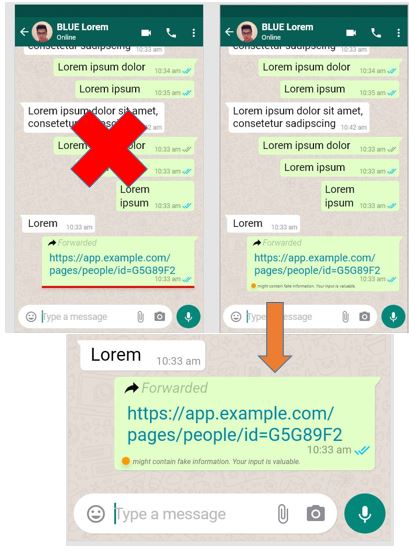
This text message approach will encourage the user to share his response objectively without being biased by the sender’s response. No matter what is the response of the sender (fake, non-fake, don’t know) the same text message with orange icon will be shared in all the three cases to the recipient. Now the recipient of the message can share his response by following the same procedure.
- Selecting the message.
- Click on the fake news icon.
- Select your response.
No matter what is the response of the recipient his screen will be updated accordingly and if he decides to share this message with his friends then his friend will receive the same text message with orange icon in order to encourage them to share their response regarding the same message objectively based on their information.
Why flags?
We have been collecting the user’s response based on their knowledge base regarding a certain piece of information and updating it in three different flag counters. The important question is how we will determine whether a certain piece of information if fake or not. Using the umbers stored in the three different flag counters we will calculate the percentage of fake, non-fake, and don’t know responses out of the total number of responses obtained from the users.
% fake = (total value stored in fake flag counter / sum total of values stored in fake, non-fake, don’t know flag counters)
% non-fake = (total value stored in non-fake flag counter / sum total of values stored in fake, non-fake, don’t know flag counters)
% don’t know = (total value stored in don’t know flag counter / sum total of values stored in fake, non-fake, don’t know flag counters)
If the total percentage of fake responses exceed 60% we will then categorize that piece of information as fake else if total percentage of non-fake responses exceeds 60% we will categorize it as a non-fake news.
Questions and problematic scenarios
First major question is should be the threshold value of total number of responses in order to apply the above formulas in order to categorize a piece of information as fake or non-fake?
If we choose 100 as the threshold value of total number of responses it may happen that out f 100, 60 responses can determine it is fake and 30 as non-fake while rest 10 responses comes under don’t know category but what if the message keeps spreading and in next 100 responses 65 inputs determine it non-fake and 25 inputs comes under fake and rest 10 under don’t know category so by the calculation out of 200 responses obtained 95 inputs will be non-fake, 85 inputs will be fake and rest 20 will come under don’t know category. So the percentage of both the fake and non-fake flag counter will be less than 60% (assumption).
One approach that can solve this problem is if the percentage of fake input or non-fake input remains always greater than the 60% from going from first 100 to 200 responses and to 300 responses than we can be certain that a particular information is fake or non-fake.
Is 60% is the best value for considering any piece of information as fake or non-fake?
Should we include the value of don’t know flag counter for our calculation?
Thorough research should be done in order to determine what should be kept the threshold value of inputs , percentage to determine fake or non-fake content , whether to include value stored in don’t know flag counter for our calculation or not.
What can be done when we categorize a piece of information as Fake?
Last year, WhatsApp introduced a global forwarding cap that blocked message-forwarding after 20 pass-ons. And in India, the limit was already lowered to just five forwards. Once the cap is reached, people would have to manually prepare the message again to be passed on (Keach, 2019). But the chances are here that the people may rewrite the same message again not knowing that the contents of the message are fake.
Our idea is not to block the message here once it has been categorized as fake but the idea here is to properly caution the user that a certain piece of information is fake so that the users themselves stop the sharing of fake content in any form be it rewriting the same message again or using the sharing option. Our system will be focused on informing the users properly about the content rather blocking without informing the users. Once the information has been categorized as fake our system will send the following response to the recipient of the message through which the user will completely understand the content is fake.

Our system generated response when it determined a fake information (Recipient will receive the above message)
Here we have we have color coded (red) the forward message as well as our cautionary message. Red color forward message is done in order make the user to understand this forward message contains fake information. It will be the first caution to the user from system’s side. Next we have added the cautionary message below the message container to encourage the user to not share the information further. Now the choice is up to the user. We are here not strictly blocking the message but this approach will make the user to think carefully whether he or she should share this message further or not. In all the above images we can at the bottom of the message that the time of message cannot be in the same line with the message so we encourage the whatsapp developers to put the time stamp along with the tick marks to the top right corner of the message container for making it more user friendly.
Limitations
- Didn’t test our prototype.
- Due to time constraints I took my own assumptions and did online research, I didn’t interview anyone to gather data related to our solution but before designing the solution I did face to face interview with few users to know their understanding of fake news.
Future Scope
- Thorough research should be done in order to determine what should be kept the threshold value of inputs , percentage to determine fake or non-fake content , whether to include value stored in don’t know flag counter for our calculation or not.
- Testing our high fidelity model.
Literature Review References:
Gupta, H., & Taneja, H. (2018, August 23). WhatsApp has a fake news problem-that can be fixed without breaking encryption. Retrieved from https://www.cjr.org/tow_center/whatsapp-doesnt-have-to-break-encryption-to-beat-fake-news.php.
Explained: What is Fake news?: Social Media and Filter Bubbles. (2018, July 2). Retrieved from https://www.webwise.ie/teachers/what-is-fake-news/.
Keach, S. (2019, January 22). WhatsApp will now BLOCK you from forwarding viral texts to stop ‘deadly hoaxes’. Retrieved from https://www.thesun.co.uk/tech/8243816/whatsapp-forward-limit-block-forwarding-spam-hoax/.
 Siddhartha Kwatra